


DramaWave - Dramas & Reels
4.57.89K Reviews
App Specs
- Version
- 2.0.21
- Updated On
- License
- Free
- Downloads
- 100,000,000+
- Developer
- SKYWORK AI PTE.LTD.
- Categories
- Entertainment
- Platform
- Android, iOS
Screenshots
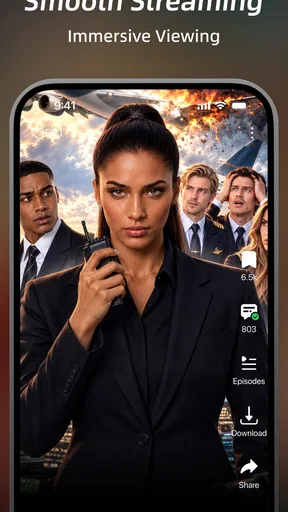
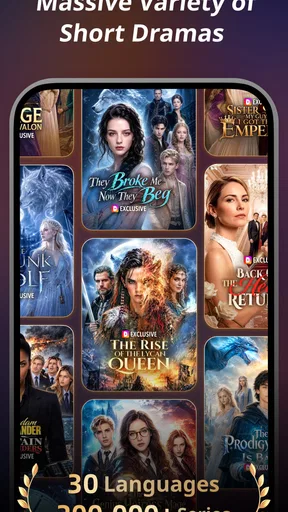
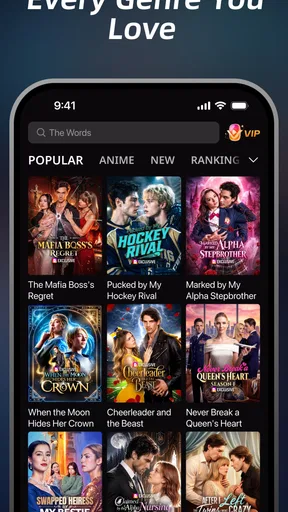

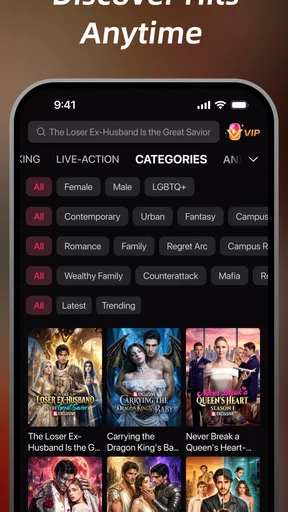

 Analysis by AppCompare
I judge a video app not just by what it promises, but by how easily I can get from opening it to watching something I actually want. DramaWave - Dramas & Reels is an entertainment app built around dramas, short-form clips and series, so it suits people who want a quick watch as much as viewers settling in for a longer story. Its appeal is specific: it puts drama-focused browsing at the center rather than trying to be an all-purpose video destination.
What to expect when you open it
In my experience, the most useful way to approach a drama app is to decide whether I have a few spare minutes or enough time for an episode before I start browsing. Short clips can help with the first case, while series are better when I want a story with room to develop. That distinction matters here because the app brings both kinds of viewing together; the choice is less about finding a video at all and more about choosing the right length for the moment.
Browsing can still take longer than expected when several titles look appealing. I try to pick a mood first—something light, tense or emotional—then narrow my search instead of opening every promising result. That simple habit makes a focused session more likely and helps keep casual viewing from turning into an aimless scroll. I would also treat a clip as a preview, not a guarantee that the full show will match its tone.
Where it fits into an ordinary day
Picture a short break between errands: I can browse for a compact piece of drama rather than start an episode I may have to abandon halfway through. Later, at home, I can switch to a longer viewing session if a story has caught my attention. That flexibility is the clearest practical reason to consider this app over a service centered only on full-length programs.
It is also a better fit for people who already know they enjoy dramatic storytelling than for someone who wants a broad mix of documentaries, sports, news and unrelated genres. The narrower focus can make choosing feel easier, but it also means I would keep a general streaming service around if I wanted a wider range of programming. DramaWave works best as a deliberate destination for drama, not necessarily as a replacement for every video app on a phone.
Exploring the Drama Universe
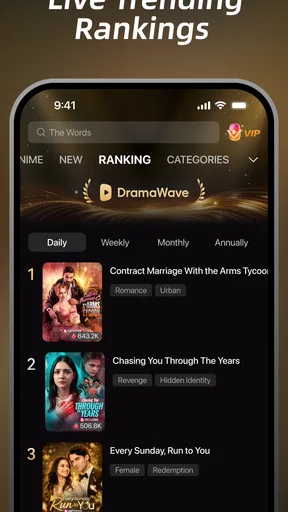
The moment I opened DramaWave - Dramas & Reels, I was greeted with a sleek and intuitive interface. It’s super easy to navigate, even if you’re someone who usually feels like a lost puppy when using new apps. The homepage offers a delightful mix of popular dramas, trending reels, and personalized recommendations. I felt like I had my own drama concierge!
What really caught my eye were the curated lists. Whether you’re into romantic comedies, action-packed thrillers, or heart-wrenching melodramas, there’s something for everyone. I spent a good hour just browsing through the collections. It’s like Netflix, but exclusively for dramas, and honestly, I’m here for it.
Worth Reading Before You Choose

Baby Panda World Brings Quick Play to Modern Phones, but Its Game Library Feels Busy

ESPN’s Live Game View Makes Following Close Games Easier

QuizzLand Review: A Good Fit for Short Trivia Breaks, Not Every Player

Basketball Stars: Multiplayer Is Fast, but Can It Recover When Matches Go Wrong?

WEBTOON Turns Phone Updates Into a Better Reading Routine

Link to Windows Runs on Shared Habits, Not Social Feeds
Features That Stand Out
One of the standout features of this app is the "Watch Together" option. You can sync up with friends and watch episodes in real-time, even if they’re miles away. It’s a game-changer for long-distance relationships or just catching up with pals over a shared love for dramas.
Another cool feature is the offline viewing option. You can download episodes when you’re on Wi-Fi and watch them later without burning through your data. Perfect for those daily commutes or long flights. I found myself binge-watching a new drama series on my way to work, and it made the journey so much better.
Reels: A Fun Twist
Now, let’s talk about the reels section. If you’re like me and love getting lost in short video clips, this is a treasure trove. The reels are bite-sized highlights from various dramas, giving you a quick taste of what’s out there. It’s a fantastic way to discover new shows without committing to an entire episode.
The app also allows you to create and share your own reels, adding a social element that I didn’t realize I’d enjoy so much. I found myself piecing together my favorite drama moments and sharing them with friends. It’s a fun way to engage with the content and the community.
Choosing between clips and episodes
One useful habit is to use the short-form side as a discovery tool, then switch to a series only when a premise genuinely interests me. That avoids treating a dramatic highlight as a substitute for the full story, where character development and pacing can be quite different. It also helps me keep a boundary around scrolling: a handful of clips can fill a small pause, while an episode is a more intentional commitment.
For a shared watch, I would agree on the title and a convenient start time before inviting friends. Real-time viewing is most enjoyable when nobody is still deciding what to watch while everyone else waits. If people have different schedules, watching separately and comparing reactions afterward may be less fussy than coordinating a session.
Speed, stability and heavier sessions
Short videos and longer episodes place different demands on a viewing session. A clip is easy to dip into, but a long stretch of viewing makes interruptions more noticeable: a weak connection, switching between apps or a low battery can spoil the flow. I would start on a reliable connection when settling in for a series and avoid assuming that every playback issue is caused by the app itself.
Offline downloads are particularly useful when I know the connection may be unreliable, such as during a commute. The practical trade-off is that downloads need planning and device storage; saving more episodes than I expect to watch can leave less room for other files. I would download a modest selection before leaving, then remove anything I no longer need when storage matters.
Claims about smooth playback should be read as a personal impression, not a promise that every phone and network will behave identically. Video quality and responsiveness can depend on the device, connection and how much else is happening on it. If a session stutters, checking the connection and closing other demanding apps are sensible first steps before deciding the service is unreliable.
Who should try it—and who may prefer something else
If drama is already your go-to genre, this focused mix of series and short clips gives you a reason to open one app for both browsing and watching. It can also suit viewers who want an easy way to sample a show before giving it a longer stretch of attention. By contrast, viewers looking for a wide catalogue across many unrelated genres may be happier with a general streaming platform, while anyone who mainly watches creator-led short videos may prefer a social video service built around that format.
The app is free to install, with optional in-app purchases ranging from under a dollar to just under two hundred dollars per item. I would check the purchase details on the screen before confirming anything, especially if a younger family member uses the device. DramaWave is rated Teen, so it is worth considering that age guidance when deciding whether it suits a household; the rating is not a substitute for checking whether particular content fits your preferences.
Finding a comfortable way to use it
For a more satisfying first session, I would browse with a short list of questions in mind: am I after a complete episode, a quick preview, or a show to share? Then I would sample a clip or two before choosing a series, rather than letting the homepage make the decision for me. This is a small workflow, but it helps separate discovery from watching and makes the app feel more useful when time is limited.
Parents and guardians may want to make the first few viewing choices together with a teen. That is a more practical approach than assuming the age label alone settles what is suitable, and it gives everyone a chance to talk about viewing habits and purchases. For solo viewers, a similar bit of intention helps: decide whether this is a quick break or a longer session before starting, particularly when tomorrow’s schedule matters.
Final Thoughts
Overall, DramaWave - Dramas & Reels is a must-have for any drama enthusiast. It combines a vast library of shows with innovative features that enhance your viewing experience. The app runs smoothly, without any of the annoying buffering issues that can ruin a binge session.
If you’re looking for an app that caters precisely to your drama cravings, give DramaWave a download. It’s a delightful blend of entertainment and convenience, perfect for both hardcore drama fans and casual viewers alike. Happy watching!
A few practical details before installing
SKYWORK AI PTE.LTD. develops the app, which has a 4.7 average from around 331,000 ratings and more than 50 million installs. It is free to download, though in-app purchases are available. The current version is 1.7.01 and it requires Android 6.0 or later. These details make it accessible to many Android users, but they do not guarantee the same playback experience on every device.
My overall recommendation is measured rather than universal: I would try it if drama is the kind of entertainment I regularly seek and I like having short previews alongside series. I would skip it if I rarely watch dramas, want one service to cover nearly every genre, or prefer not to manage downloads and optional purchases. The best test is a focused first session: choose a clip, see whether a series holds your interest, and decide whether that drama-centered routine belongs in your rotation.
Pros
- Extensive library of trending dramas.
- User-friendly interface with smooth navigation.
- High-quality video streaming available.
- Personalized recommendations based on preferences.
- Offline viewing option for downloaded content.
Cons
- Requires subscription for premium features.
- Some ads in the free version.
- Limited availability in certain regions.
- Occasional buffering on slower networks.
- No parental controls for younger audiences.
FAQs for DramaWave - Dramas & Reels
What is DramaWave, and how does it work?
DramaWave is a mobile application designed for streaming a vast collection of dramas and short reels. Users can explore diverse genres, create watchlists, and enjoy content at their convenience. The app features a user-friendly interface with easy navigation, allowing users to search and discover new series and clips tailored to their preferences.
Is DramaWave available for both Android and iOS devices?
Yes, DramaWave is available for both Android and iOS platforms. Users can download the app from the Google Play Store for Android devices and the Apple App Store for iOS devices. The app is optimized for performance on a wide range of smartphones and tablets, ensuring a smooth viewing experience.
Are there any subscription fees or in-app purchases in DramaWave?
DramaWave offers a freemium model, where users can access a selection of content for free with ads. For an ad-free experience and access to premium content, users can opt for a subscription plan. Various pricing options are available, allowing users to choose a plan that suits their viewing habits and budget.
What types of content can I find on DramaWave?
DramaWave hosts a diverse library of content, including popular TV dramas, short reels, and web series from various genres such as romance, thriller, comedy, and more. The app regularly updates its catalog to include the latest releases and trending shows, ensuring that users always have something new to watch.
How can I ensure a smooth streaming experience on DramaWave?
To enjoy uninterrupted streaming on DramaWave, ensure that you have a stable internet connection. The app supports streaming on both Wi-Fi and mobile data. For optimal performance, it is recommended to use a Wi-Fi connection with sufficient bandwidth. Additionally, updating the app regularly will help improve stability and access new features.


